
One of the apps we build for is a health and nutrition app in Mexico. Since May it lets users bank calories: they eat a little less on most days of the week and spend the difference on the days they choose, with the weekly total unchanged. When personalized macro targets arrived in August, a question that had been sitting quietly under banking came up. On a save day the calorie target drops, and nobody had decided whether the protein target should drop with it. We answered that three different ways in two days. This post is about how that happened and the version we kept.
How banking works
Banking shipped on May 11. Before that the app had a hardcoded pattern (save Monday to Friday, spend on the weekend). The May change added a list of spend days to each user’s profile (Saturday and Sunday by default) and a function that turns the base daily target into the day’s effective target. On a save day it’s the base minus the amount banked per day. On a spend day it’s the base plus everything banked that week, split across the spend days. A weekly balance card on the dashboard shows how much has been banked and what’s left to spend.
The math was the easy part. The work since then has been making every screen agree on which target applies today. In June we found that the profile endpoint the app reads didn’t return the two banking fields at all, so banking settings didn’t reach the screens that read through it. At the end of July we found that the older dashboard’s weekly chart drew the raw base target for every day, ignoring save and spend days. The coaching agent got its own tools for banking context in July, including the spend days a user configured. Each fix was small, but each one was a place where a user would have seen two different numbers for the same day.
Macros followed the day’s calories
Until August, automatic macro targets were a fixed split of the day’s effective calories by goal. For someone losing weight the split was 40% protein, 30% carbs and 30% fat. Take a base of 2,000 kcal, which the app’s own tests use: protein comes to 200 g on a normal day. On a 1,600 kcal save day the same split gives 160 g, and on a 2,400 kcal spend day it gives 240 g.
Carbs and fat moving with the day’s calories is what banking is for. Protein moving 80 g between a save day and a spend day is harder to defend. That’s what we set out to fix on August 4.
Two commits on August 4
The first commit anchored protein to the base target. Protein was computed from the base daily target, and carbs and fat absorbed the rest of the day’s effective calories in their original proportion. With the same 2,000 kcal base, a 1,600 kcal save day came out at 200 g of protein, 100 g of carbs and 44 g of fat, and a 2,400 kcal spend day at 200 g, 200 g and 89 g. The same commit added a dialog on the dashboard so users could view and edit their targets without going to the profile.
Later that day a second commit reverted it. Its reasoning was consistency: the calorie target already flexes with save and spend days, so macros should scale with each day’s effective calories too, all three of them. To give users control over the result, it added manual overrides for each kind of day. Three new profile columns held the spend-day grams, and the profile page and the dialog showed both sets when banking was on.
Both versions could be argued for. The question underneath them (what protein should depend on) is a nutrition question, and we were answering it with whichever percentage split was already in the code.
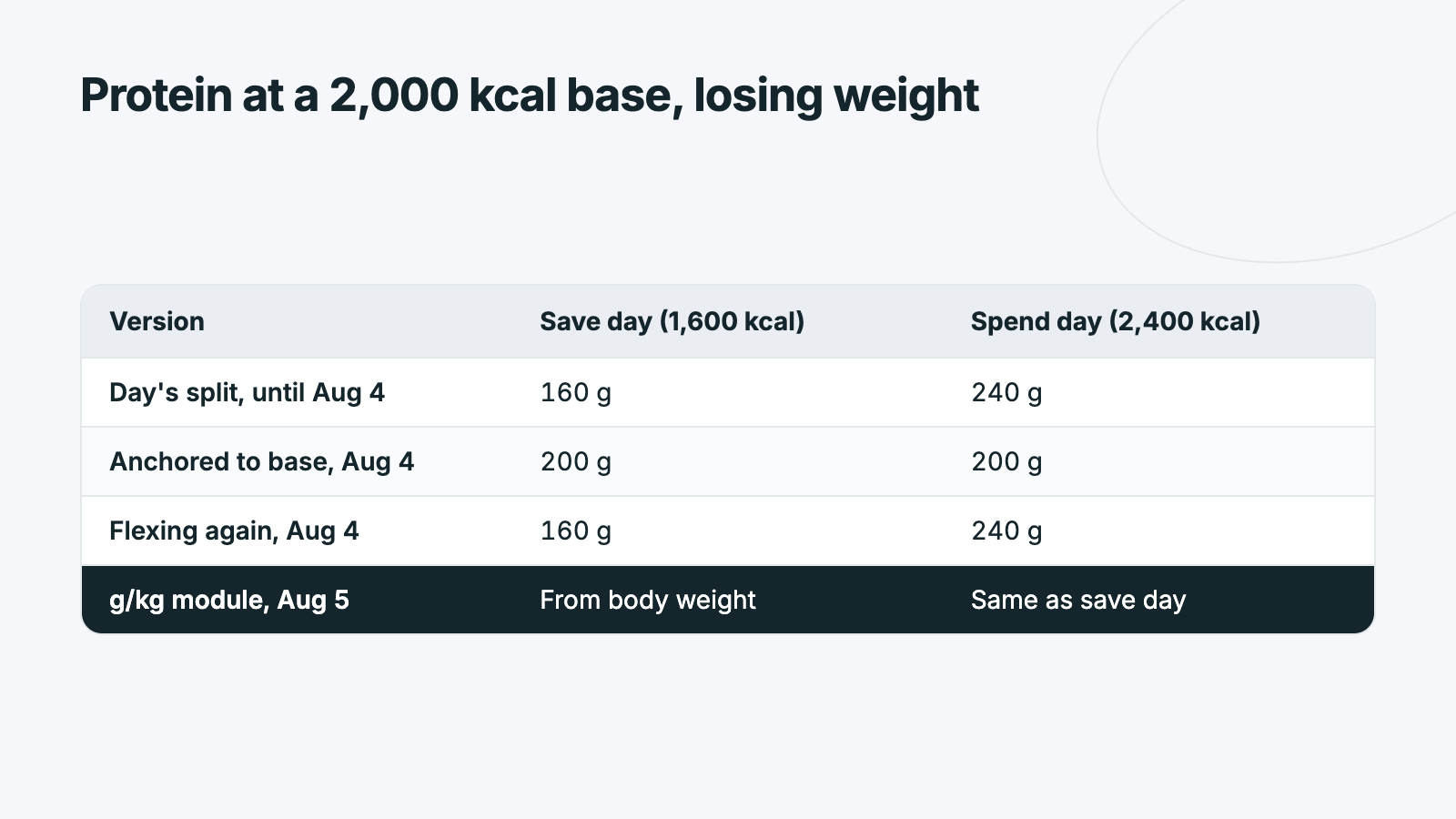
On August 5 we replaced both with a requirements module, nutrition-requirements.ts, written so the nutrition team can audit it. The rule it implements is that macro targets come from the base daily target and don’t change between save and spend days. Only the calorie target flexes with banking.
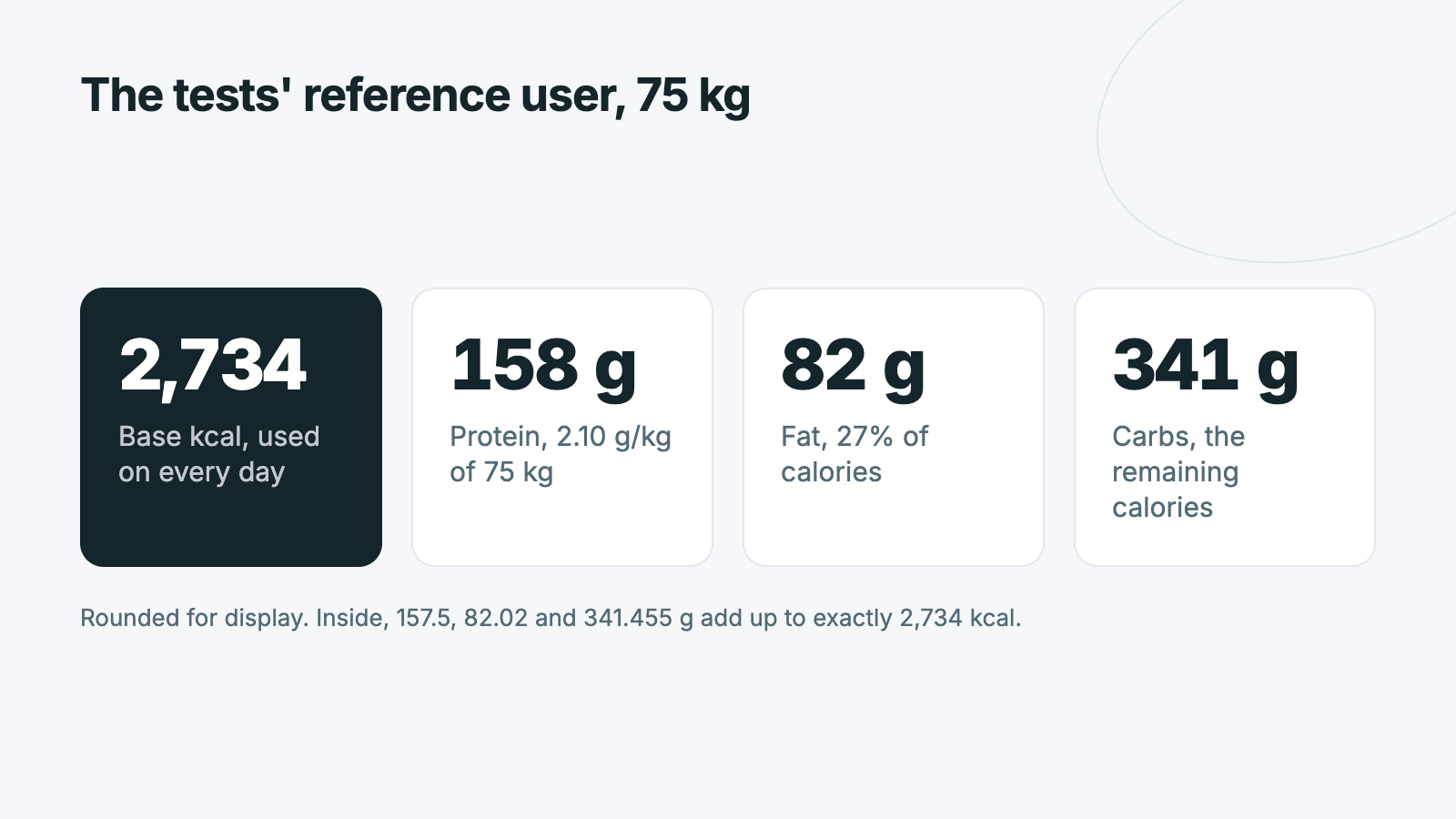
Protein no longer comes from a percentage of calories. It’s grams per kilo of a reference weight, with a factor that depends on activity level and goal. Activity sets the base factor, from 1.60 g/kg for sedentary users through 1.75, 1.90 and 2.00 up to 2.10 for the most active. The goal adds 0.10 g/kg for losing or gaining weight and nothing for maintaining, whatever pace the user picked. That pace shapes the calorie target upstream and nothing in this module. A global clamp then keeps the factor between 1.6 and 2.2 g/kg.
The reference weight is the user’s weight when their BMI is 24.9 or below. Above that, it’s the Devine ideal weight plus 40% of the gap to the user’s actual weight. The module’s comment says why: to avoid overestimating protein and fat on mass that is probably not lean. Fat is 27% of the base calories, with an absolute floor of 0.5 g per kilo of reference weight that the module’s comment calls a safety floor for hormonal health. Carbs take whatever calories remain.
flowchart LR
    P[Profile: weight, height, sex, activity, goal] --> B[BMI]
    B --> W[Reference weight]
    W --> PR[Protein: factor x reference weight]
    T[Base daily calories] --> F[Fat: 27% with a g/kg floor]
    W --> F
    PR --> C[Carbs: the remainder]
    F --> C
    T --> C
The module is a pure function with no I/O, no clock and no randomness. Nothing inside it is rounded, so protein, fat and carbs add back up to the calorie target exactly, and rounding happens only where a value is displayed or stored. Inputs are validated with messages in Spanish. When a profile’s calories can’t cover its protein and minimum fat, it throws a descriptive error instead of returning negative carbs, and the app falls back to the old percentage split (as it does while a profile is still missing a field during onboarding). The factors are plain exported constants, so the nutrition team can retune them without touching the logic.
One detail came from matching a spec to the data we already had. The activity levels in the spec had five names that don’t match the five values stored on profiles. They line up by the label users see, not by string, so the stored value activo (labeled “Muy activo”) gets 2.00 and muy_activo (labeled “Extremadamente activo”) gets 2.10. The test file explains that mapping at the top.
The commit dropped the spend-day columns from the day before and kept manual overrides as a single set of targets. It came with a 233-line test file covering a reference user, an overweight user, the 1.60 floor for a sedentary user maintaining weight, the 2.20 ceiling for the most active, the fat floor, the error for calories that are too low, input validation, purity and the rate having no effect.
Calories still differ from day to day, and the rest of the app caught up in the following week. On August 11 the endpoint that generates a week of meals started accepting a target per day, so a plan’s save days and spend days get different calories. On August 14 we added tests for those per-day overrides, including that each meal slot scales from the day’s own target and that days outside one to seven are ignored.
What we’d keep
We’d write it the way it ended up. A pure function with its factors as named constants is something a nutritionist can read line by line, and the tests document each case in terms the nutrition team uses. Leaving everything unrounded until display means the three macros always add back up to the calorie target. If we did it again, we’d ask the nutrition team for the rule before writing either of the August 4 commits. They own it, and the module now gives them one place to change it.