
A register that needs the internet to sell will stop the counter every time the connection drops. TRUE POS, our point of sale, is built the other way around. Every register keeps its own database, sells from it and syncs with the server whenever there’s a connection. We’re piloting it with an independent café in Mexico, where over the last few weeks it has picked up card payments on a terminal, online orders from the café’s catalog, a loyalty program and a prepaid balance. Those are the visible parts. This post is about the part underneath them that had to be right first: how a sale survives without a connection and reaches the server exactly once.
The register keeps its own database
TRUE POS is an Electron app with React. Each register has a local SQLite database. Since October the same code also runs in the browser at the business’s own address, with SQLite inside the browser and saved in the site’s storage. Either way, a sale is written locally first, in one transaction with its items and discounts plus the stock it moves. Only after that commits does the screen clear for the next customer. That order came from a bug we found in the older desktop code, which cleared the sale before saving it, so an error at the wrong moment lost the sale entirely.
The tables that sync have a local ID, a remote ID and a column called refresh_type. A row waiting to go up is marked POST, PUT or DELETE. The sync code treats that mark as a promise to the cashier: a row with a pending change is never overwritten by what the server sends back. When the server’s version of a sale arrives while the local one is still waiting to upload, the pull skips it and the local change wins until it has been sent.
A register never uploads a stock count. Each sale writes an inventory movement with a negative change and a reason (“Venta”). Editing or deleting a sale writes the movement that undoes it. The server applies each movement to the item’s quantity. Two registers selling the same product while offline produce two movements that both count, so there’s no stock figure for them to fight over.
The sync loop
Every 10 seconds, if the browser reports a connection, the register uploads its pending sales and then pulls changes to its own sales. A slower loop every 60 seconds refreshes discounts and redeems promo codes that were used offline. When the connection comes back, the register runs a sync right away instead of waiting for the next tick.
Each of those jobs runs inside a small wrapper called singleFlight. It does one thing: if the previous run of the same job is still going, the new tick returns immediately. We added it after finding that a slow upload could overlap with the next tick and post the same pending sale twice. The wrapper also catches and logs failures, so a job that throws doesn’t turn into an unhandled error every 10 seconds.
The upload itself is ordinary. Each pending sale goes up as a POST, PUT or DELETE with its items and discounts. The local row is cleared once the server answers. A sale deleted before it ever reached the server is simply dropped locally. A DELETE that comes back as 404 means the sale is already gone on the server, so the register stops retrying it.
IDs are made at the register
The piece that makes retries safe is the sale’s identity. The register names each sale with a UUID at the moment of the sale, using the browser’s crypto.randomUUID when it exists and random bytes when it doesn’t. The folio printed on the ticket is the UUID’s first eight characters in uppercase (A3F29C1D, for example). Unlike a running count of sales, it’s the same on every register and on the server.
We wanted IDs that need no coordination. A count kept per register needs the registers to agree on numbering. IDs assigned by the server mean no folio until there’s a connection. A UUID made at the register needs neither, which is the whole point when the network is the thing that’s missing.
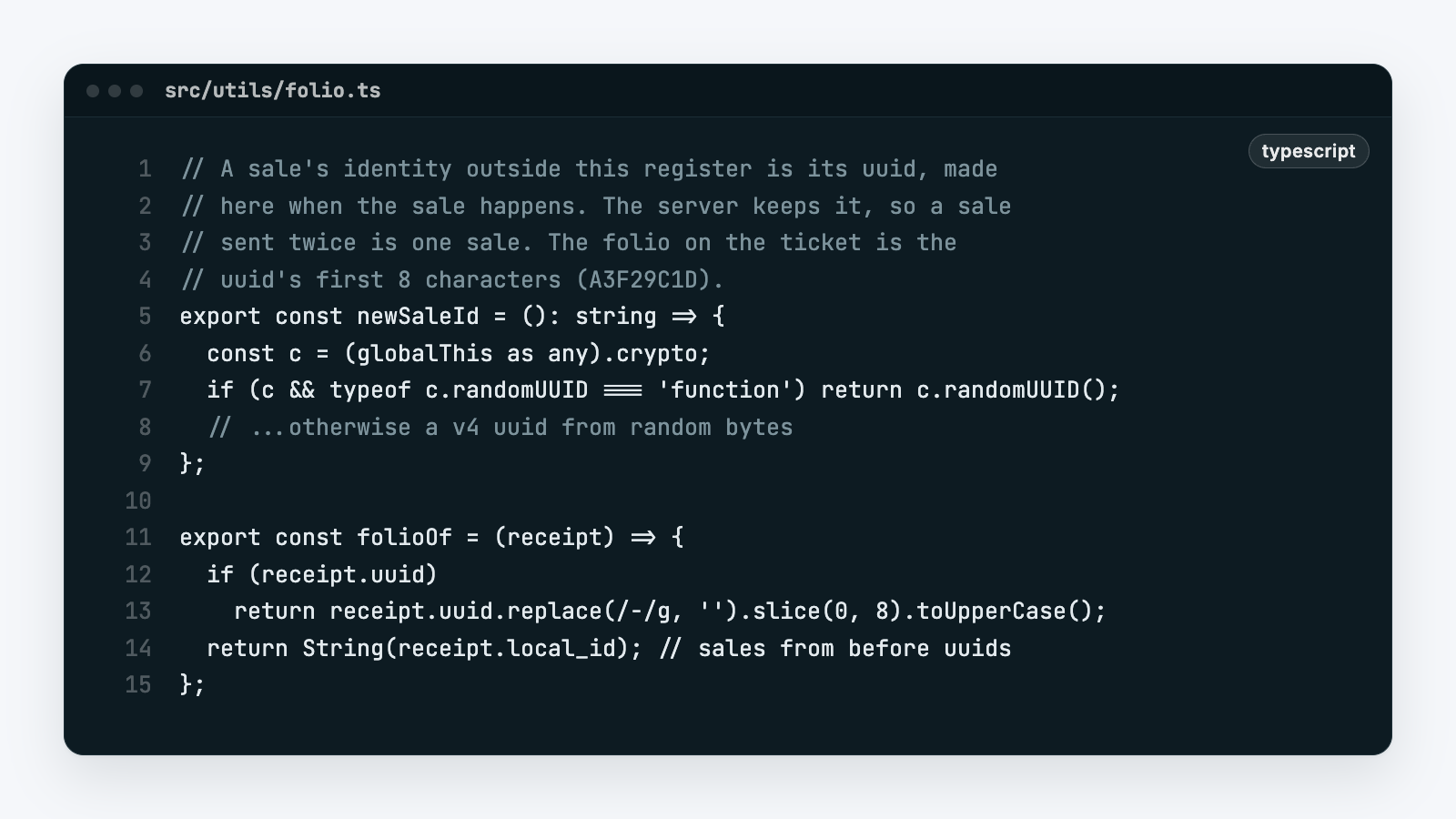
On the server, a POST that carries a UUID it already has returns the sale it saved instead of creating a second one. If that UUID belongs to a different business, it answers 409. Creating the sale runs in a single transaction with the customer’s loyalty visit, for a reason that only shows up with retries: a sale saved without its visit (say, an error halfway through) would come back as “already saved” on the next attempt. That visit would then never count. Sales saved before we introduced UUIDs keep their local number as their folio.
Pulling changes back
Each register keeps only its own sales. The admin console is where every register’s sales come together. We tried the other way first. Versions 1.5 and 1.6 pulled every register’s sales into each register’s history. Current versions remove them again.
To pull, the register asks api/receipts/changes/ for its own paid sales that were created, changed or deleted after a cursor. The server answers oldest first, up to 500 at a time, with the next cursor and a flag that says whether there’s more. The first request without a cursor brings the last 30 days. The register pages through at most 20 times per run and stores the cursor in its local database next to the sales, because a settings file or the browser’s local storage can outlive the database they describe. Pulled sales never move stock, since the register that made the sale already did.
What needs a connection, on purpose
Offline-first doesn’t mean everything works offline. We decided case by case. A few things deliberately wait for the network:
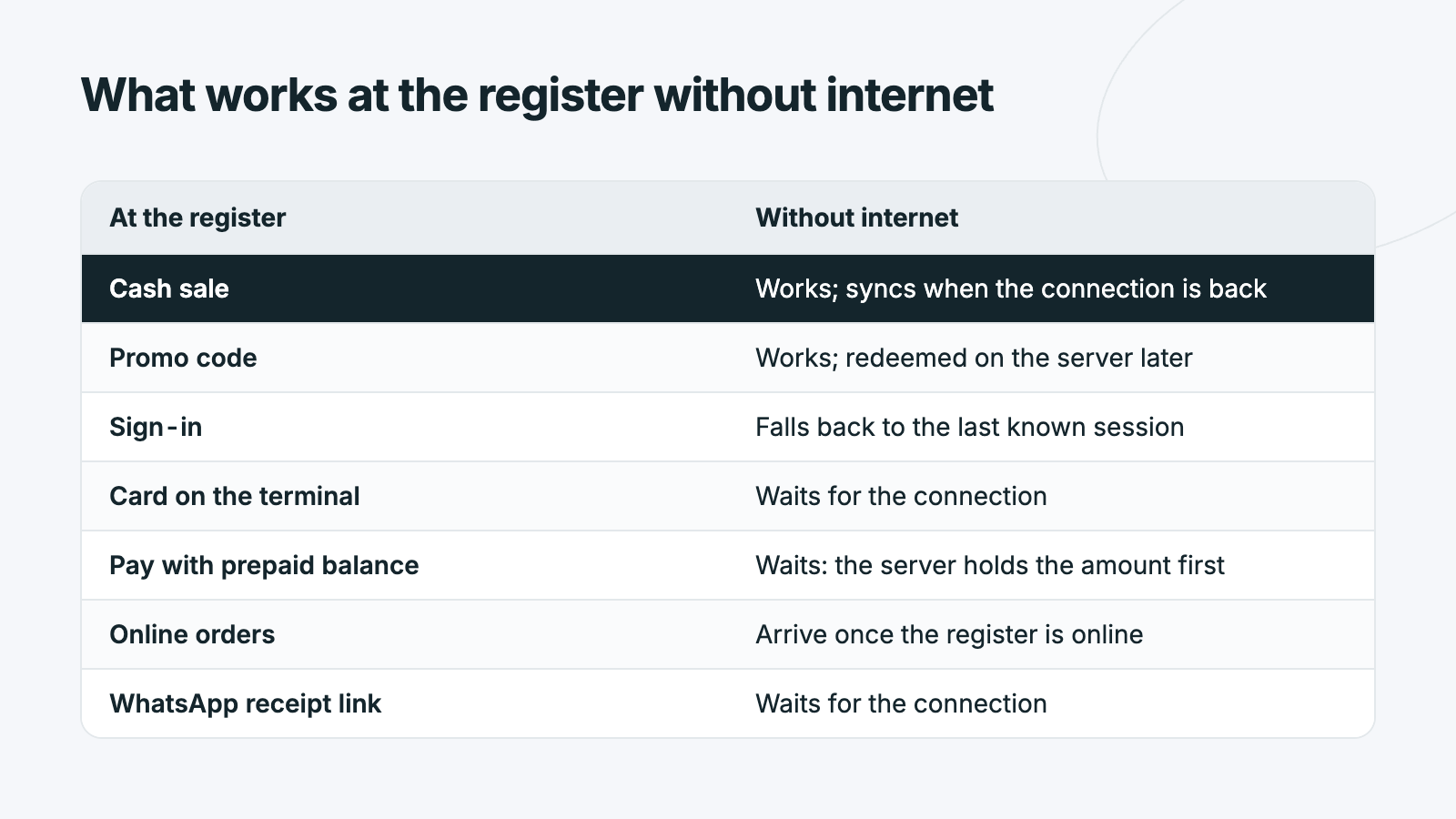
Sessions get the opposite treatment. A network error keeps the cashier signed in. Only a 401 from the server when the token is refreshed signs them out. If the server can’t be reached at sign-in, the register falls back to the last session it knows.
What we’re still fixing
The browser register has one gap we haven’t closed. When Safari refuses the site’s private file storage (which we’ve seen in WebKit and always happens in private windows), the register’s database lives in memory. Since version 1.7.3 it downloads products and its own sales again every time it opens, but a sale that hasn’t been sent yet is lost if the page reloads while offline. The register shows a notice when this happens. The fix is either a storage Safari keeps (a database backed by IndexedDB) or recommending Chrome at the counter.
Before the pilot we ran the desktop app through 46 scripted steps in Electron with real mouse and keyboard events, against a copy of the server and a local database. The run checked the printed tickets and the sync on the server copy, with no duplicate sales and nothing left pending. Real card charges were tested end to end with real money and real devices on November 1. Installed registers now update themselves, checking for a new version on start and every four hours.