
The health and nutrition app we work on in Mexico has 30 beta testers, and they wanted to log packaged food by scanning its barcode instead of searching for it. The app’s food search runs on a licensed nutrition API, so the obvious plan was to put a camera in front of that API’s barcode lookup. We shipped a scanner on September 17. It doesn’t work that way, and this post is about why.
We built the lookup before the camera
The first phase had no camera. Resolution happens on the server and a code can be tested by pasting the number. That let us answer what decides whether a camera is worth building, which is how many of the products people actually have in their kitchens we can resolve.
The licensed API answered it badly. Tested with real Mexican barcodes, its barcode lookup returned a food ID of zero for the whole 750 range, which is where Mexican products’ codes start. A cereal sold in the United States resolved fine. What made it serious is that the API returned zero instead of an error. A scanner built on it wouldn’t fail loudly in Mexico; it would fail quietly, and to the user it would look like "this product doesn’t exist".
So the lookup became a cascade:
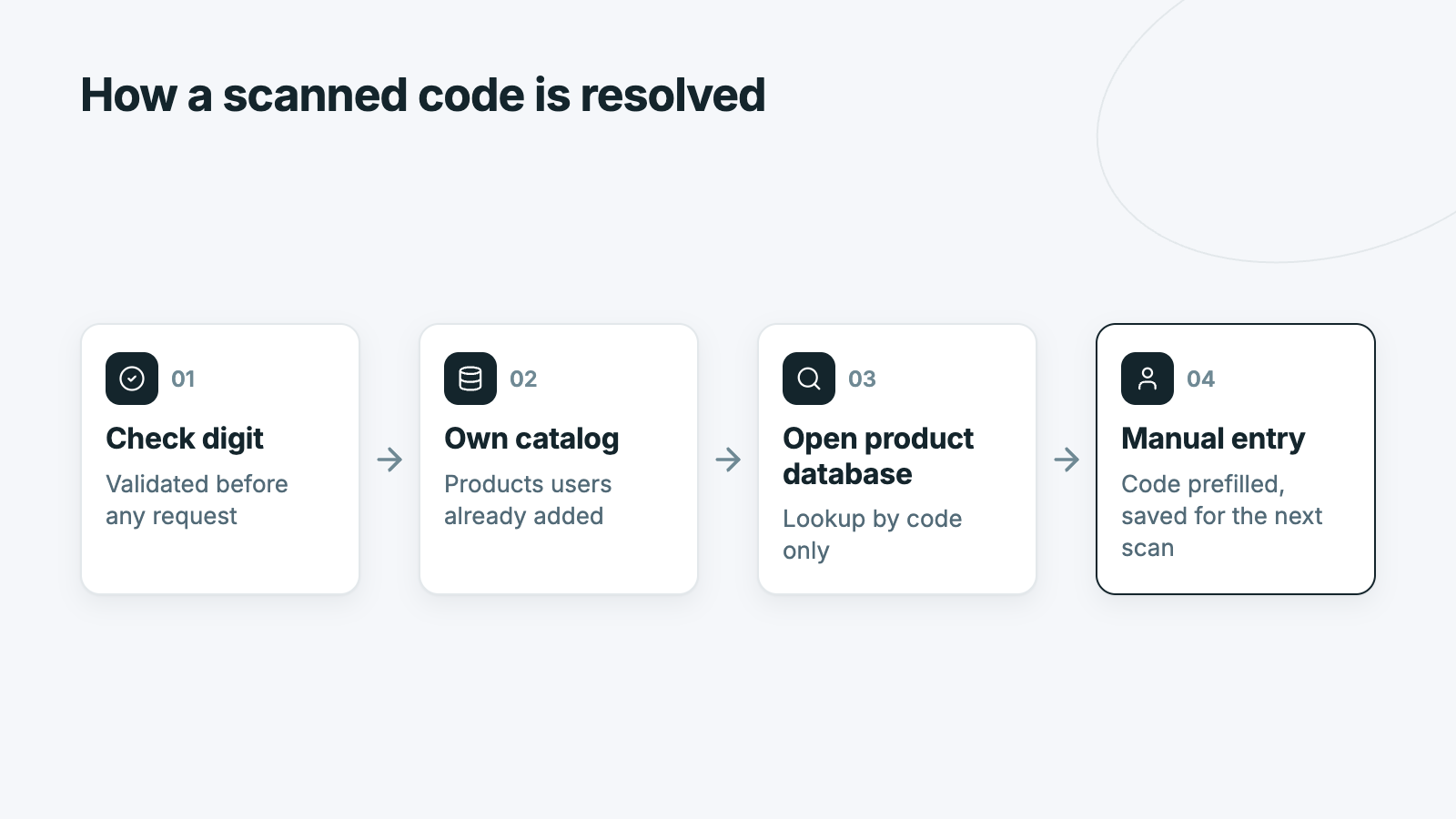
The check digit is validated before any request, because a camera in poor light often returns corrupted reads. Codes are normalized to 13 digits, since the same product reads as a 12-digit UPC-A or a 13-digit EAN-13 depending on the reader and the catalog would otherwise collect duplicates.
Crowd-edited data needs a filter
Nobody validates the figures in a crowd-edited database. Sampling 100 Mexican products, we found a breakfast cereal declaring 747.5 g of salt per 100 g of product. Someone had typed 299 into a grams field when the real figure was 299 mg, and the automatic salt calculation (sodium times 2.5) carried the mistake along. Our sanitizer drops the bad field and keeps the food, since the same record had correct calories and macros.
A coconut drink declared 30 g of sodium per 100 g, which would make it 76% salt. That fits under the chemical ceiling of 40 g (table salt is 39.3% sodium by mass), so no physical rule catches it. Rather than invent an arbitrary threshold, we keep such values and flag the food for human review.
Measuring with products from a store shelf
To measure coverage we took 20 products from a Mexican supermarket’s online catalog. We picked it because it’s independent of the open database, since sampling from the database we were measuring would give 100% by construction.
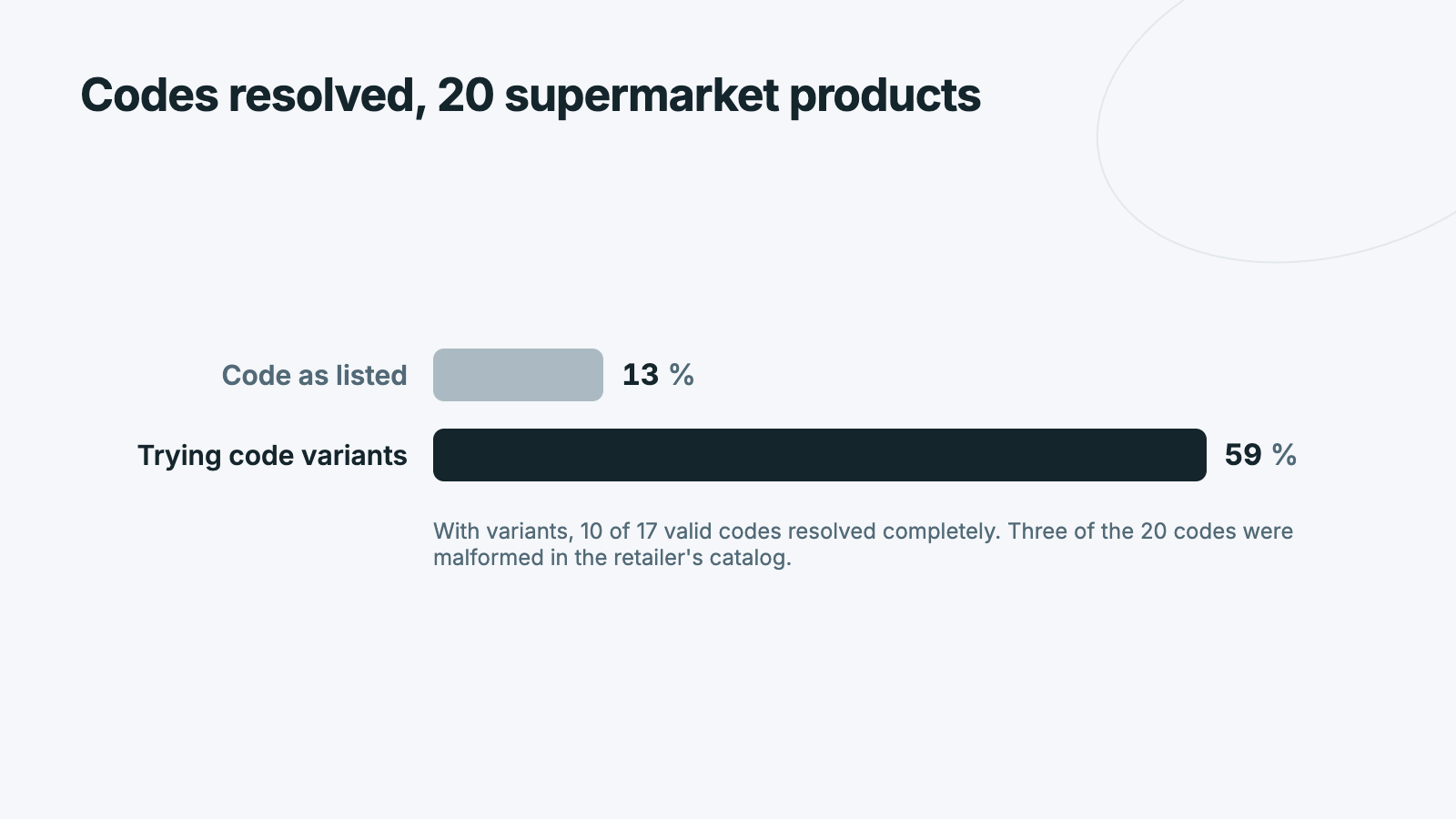
The first run resolved 13%. The problem turned out to be the shape of the codes rather than coverage. The codes retailers store are often for the case (a 14-digit code with an indicator digit) rather than for the unit someone has in their kitchen, and several came as 12 digits that were really an EAN-13 missing its check digit. Converted to the consumer unit, the same products resolved. We added a function that returns the plausible readings of a code in order, and the route tries each until one resolves. It stays out of normalization, which is what gets stored in the catalog and has to be deterministic.
The batch run turned up a second problem. The open database started throttling us and several requests timed out, and because the adapter returned the same null for “not found” and "couldn’t ask", the measurement counted products as missing that were there (we checked them one by one afterwards). It was the same silent failure we had rejected in the licensed API, and in the app a user would end up typing in a product the database already had. The adapter now returns one of three results (found, not found or error), and on an error the route answers 503 with a retry flag instead of sending the user to manual entry. The measurement script leaves failures out of the denominator and waits 1.5 seconds between requests.
The camera came second
The reader uses two engines. Where the browser has the native BarcodeDetector (Chrome), it uses that. Elsewhere it uses zxing compiled to WebAssembly, which is the path most of this app’s users will take: Safari has BarcodeDetector disabled by default since iOS 17 and Firefox doesn’t implement it. The WebAssembly file is about 930 KB, served from the app itself and loaded with a dynamic import only when someone opens the reader. The nutrition page’s bundle stayed at 30.9 kB.
The reader needs two identical reads in a row before it accepts a code, because a single blurry frame can decode as a different product. Formats are limited to EAN-13, EAN-8, UPC-A and UPC-E. The camera stream stops when the reader closes, since otherwise the camera light stays on and the phone warms up until the tab closes.
The decision logic lives in pure functions with tests, not in the component, since a false positive logs the wrong food in someone’s diary. Checking in the browser still found a bug no test had: with the camera permission denied, typing a code moved nothing, because the reader only accepted a confirmed code while it was scanning. Typing now works from any state. Manual entry also moved up from the third phase, because a 59% resolution rate means about four in ten scans end there.
Nothing scanned was being saved
After two rounds of testing on phones, we checked the database directly and found no scanned food in the catalog. The lookup resolved the code, the screen showed the right figures and the user logged it in their diary, but the copy into the catalog was being rejected. The foods table has a CHECK constraint on its source column that allowed three values, and the new source wasn’t one of them. Postgres answered with error 23514.
We had ruled that out earlier by searching the migrations for the constraint and finding only the one on recipes. The constraint existed, but the foods table had been created outside migration control, so it never appeared in the repo. It survived two rounds of testing because the failure was silent. The error was logged without context and the screen behaved normally, since the diary entry did save. The fix was a migration that replaces the constraint, found by its definition because its name isn’t documented anywhere. The route now logs the Postgres code with the barcode. A new test compares the sources the code writes with the ones the migration allows, which no existing test could do, because they all mock the database client.
The same afternoon brought more of the same kind. Rejecting a scanned food did nothing, because the table’s read policy let through any source that wasn’t user-submitted. We fixed that in row-level security rather than in the five endpoints that serve foods. The review queue first took every scanned product, which with 30 beta testers would have meant hundreds of items nobody on the team had in hand. It now takes only foods the system flagged and foods a user reported, and a report wins over an earlier approval. We also added a rule that sent any record with every value at zero to manual entry, after scanning a 355 ml soda that came back with zeros. It was the sugar-free version, so the zeros were real, and we removed the rule within the hour, since diet sodas and water really are zero.
What we’d keep
We’d measure coverage with real products again before building a camera. Twenty products from an independent catalog changed both the lookup and the order of the work. We’d ask the database rather than the repo which constraints exist. The failures that cost us the most all looked like an absence, such as a product counted as missing when it was there or a row that was never written. We’d keep putting those decisions in pure functions with tests, so a test fails when something that should be there isn’t.