
Each business on TRUE POS, our point of sale for small businesses in Mexico, can publish a catalog: its products with photos, options and prices at its own address, or on the business’s own website. Since October 21 that catalog can take orders. A customer picks products and their options, fills a cart and sends an order for pickup or delivery. The order shows up at the register with a badge and a sound, and the team accepts it, marks it ready and charges it when the customer picks it up or it’s delivered.
This post is about the decisions underneath that flow. An order is a sale that isn’t paid yet. Prices are always recomputed on the server. The customer keeps a private link to follow the order, and the endpoint that receives orders is public, so it has to protect itself.
An order is a sale that isn’t paid yet
We didn’t add an orders table. An order is a Receipt, the same model as a sale made at the register, with the same lines, options, customer and totals. What makes it an order is its channel (online), its fulfillment (pickup or delivery) and its status. Sales made at the register are created as paid. An order starts as open and moves through a short list of states:
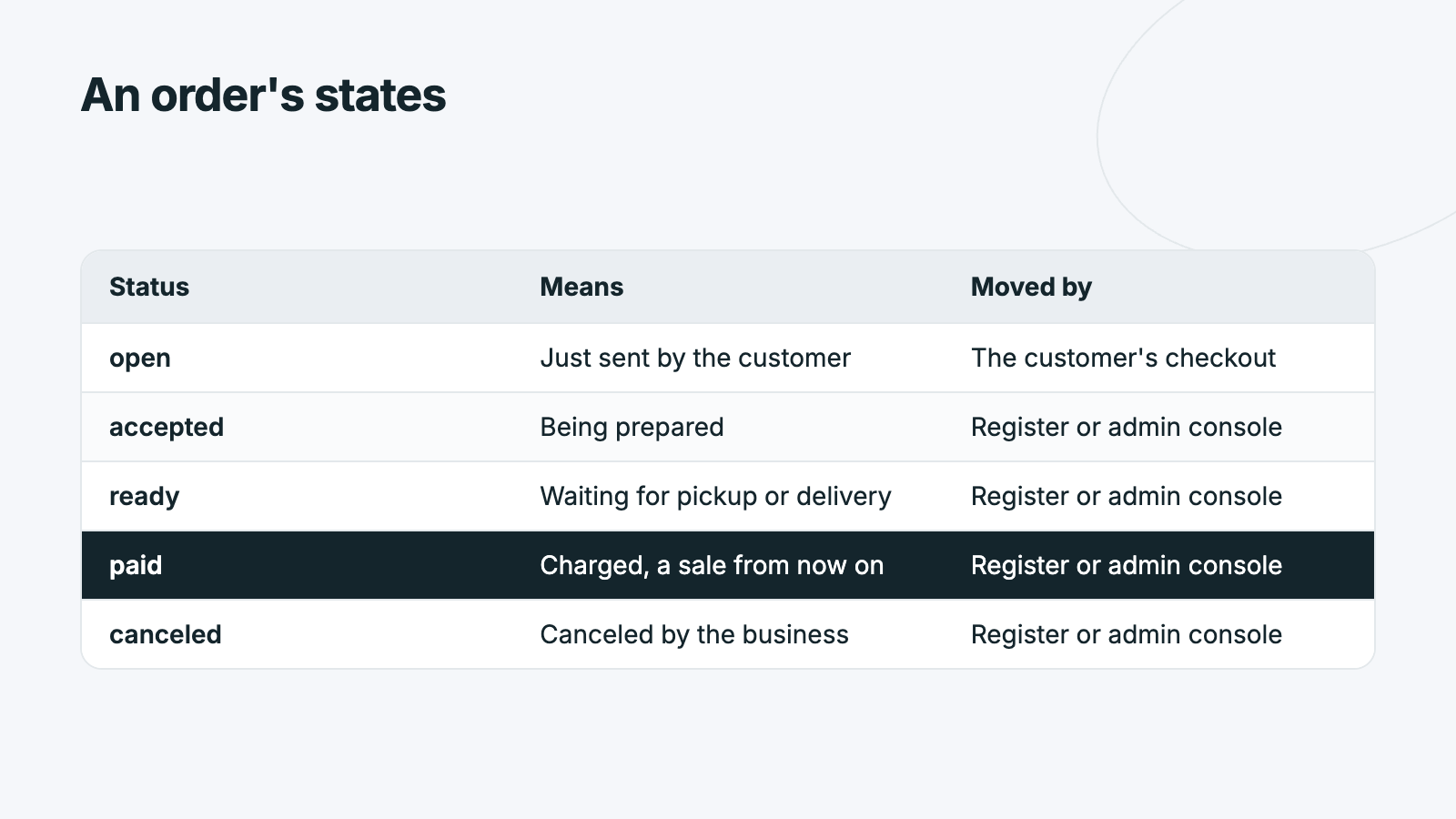
Once charged, an order is a sale like any other. It appears in reports and in the sales history, it counts as a loyalty visit for the customer, its ticket prints and its products come out of inventory, at the register or in the admin console. Most of that came from reusing Receipt. The one rule we had to make explicit runs the other way. Lists and reports count paid sales only, so an open order never inflates the day’s sales. Before orders existed every sale was paid, so the filter changed no existing number.
Prices come from the server
The browser sends product IDs, quantities, chosen option IDs and notes. It never sends a price. The server rebuilds every line from the catalog:
- The product has to belong to that business, be enabled, be shown in the catalog and not be sold out or announced as coming soon.
- Each chosen option has to belong to one of the product’s enabled option groups, and each group’s minimum and maximum selections are enforced.
- The line price is the product’s price plus the price of each chosen option.
- An order takes at most 50 lines, with quantities from 1 to 99.
If anything fails, the whole order is refused with the first problem, worded for the customer (“Uno de los productos ya no está disponible.”). A cart that sat in a browser while the business marked something sold out can’t sneak it through.
The business sets a minimum order, checked against the recomputed subtotal, and a delivery fee as a rule. A fee rule can be fixed, a percentage with a minimum and a maximum, an amount per item or a table of ranges by order total, and any of them can round up to a step. The same rules serve the service fees of businesses that buy on their customers’ behalf. The checkout computes the fee with the same math to show it before the customer sends the order, and the server computes it again when the order arrives.
The customer and the tracking link
The checkout asks for a name and a phone, plus an address for delivery. The phone is how TRUE POS identifies customers (one customer per phone in a business), so the order is attached to the customer with that phone or creates one. Consent to promotions is recorded when the customer gives it, and the order counts as their loyalty visit once it’s charged. Since October 22 a delivery checkout can also share the customer’s current location. The written address then becomes optional (for references), and the order card at the register links to the location on a map.
The server answers with the order’s folio (the first eight characters of its UUID) and a tracking path, /<slug>/pedido/<token>. The token comes from secrets.token_urlsafe(18), which is 24 characters and 144 random bits. The tracking page shows that order’s status, lines and totals, refreshing every 15 seconds while the order is still open, accepted or ready. It never shows other orders, and it never shows the customer’s location.
A public endpoint that protects itself
Anyone can post an order, so the endpoint protects itself. It’s throttled per address, and the checkout form carries a check that turns away automated submissions. The business also has to have orders turned on, and the endpoint answers 409 when it doesn’t.
Everything else the endpoint accepts is validated and trimmed. Names, notes and addresses are capped in length and whitespace is collapsed, the phone must be a complete number and the fulfillment must be one the business offers.
sequenceDiagram
    participant C as Customer's browser
    participant S as Server
    participant R as Register
    C->>S: POST the cart: product ids, options, quantities
    S->>S: Rebuild prices from the catalog, save an open order
    S-->>C: Folio and tracking link
    R->>S: Poll open orders every 15 s
    S-->>R: Orders to handle
    R->>R: Badge and chime for a new one
    R->>S: Accept, then mark ready
    C->>S: Tracking page shows the new status
    R->>S: Charge the order
    S->>S: Paid sale, loyalty visit, stock out
At the register
The register asks the server for orders to handle every 15 seconds while it’s online, and again as soon as the connection comes back. The first answer after opening only fills the list. After that, an open order it hasn’t seen before plays a short two-note chime through the Web Audio API, shows a desktop notification when the user allowed them and puts a notice on screen. The badge in the menu counts orders that haven’t been accepted yet.
Orders live on the server, so this part needs the internet. The register keeps selling without it, and orders arrive once it’s back online, as we described in the post about how TRUE POS works offline.
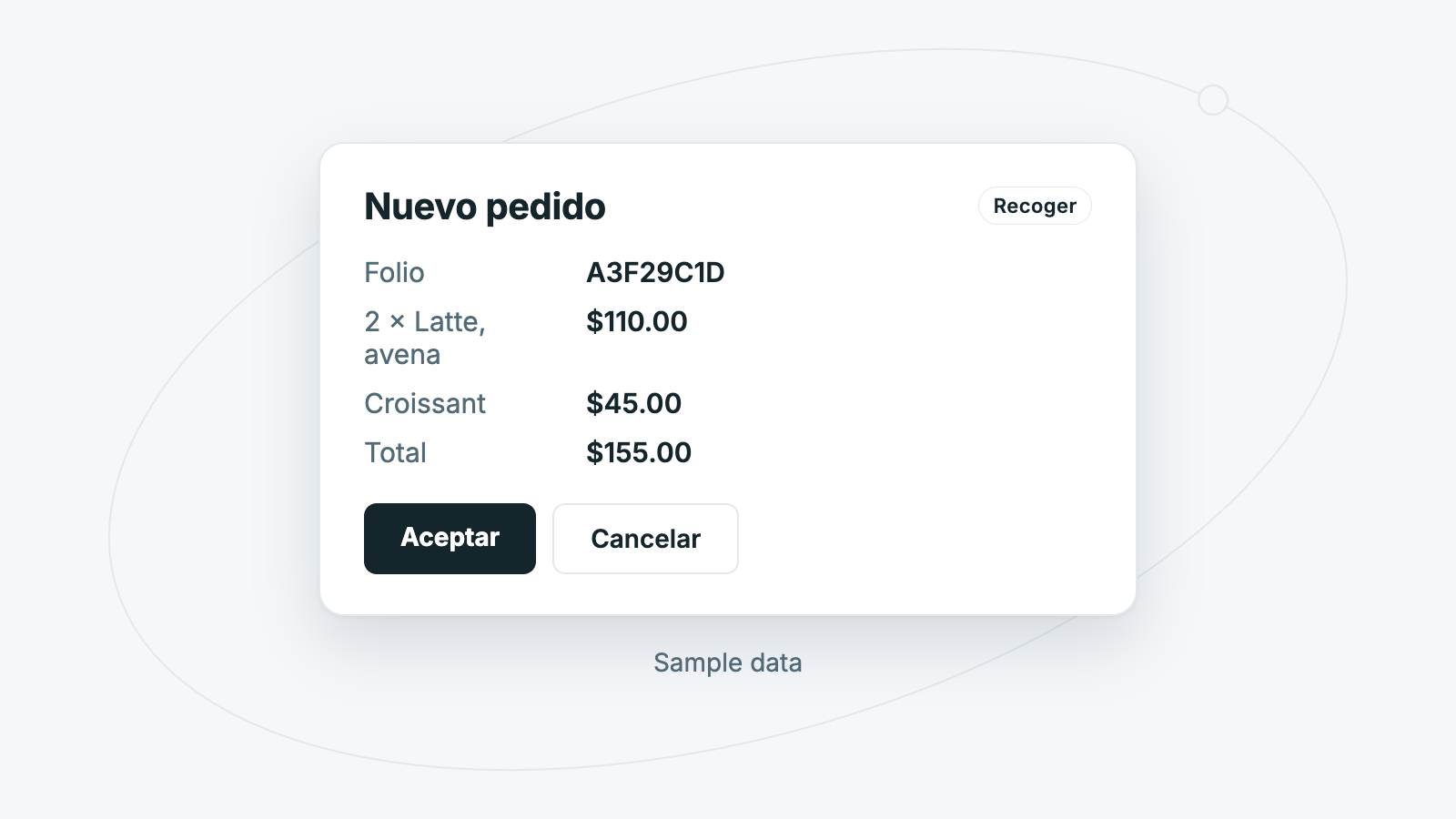
Each business turns orders on in the admin console and chooses pickup, delivery or both (at least one when orders are on), the delivery fee rule, the minimum order and a short message of up to 200 characters for the catalog.
This week orders also started taking the business’s own promotions and the customer’s loyalty rewards, so an order costs online what it costs at the counter. The rewards come with the customer’s card, which they open on their phone, rather than with a name and phone typed into the checkout, since anyone could type those.